Die App im Überblick
Vier Tabs und die zentrale Bryan-Taste führen durch die App.
Am unteren Rand führen vier Tabs durch die App, in der Mitte die Bryan-Taste.
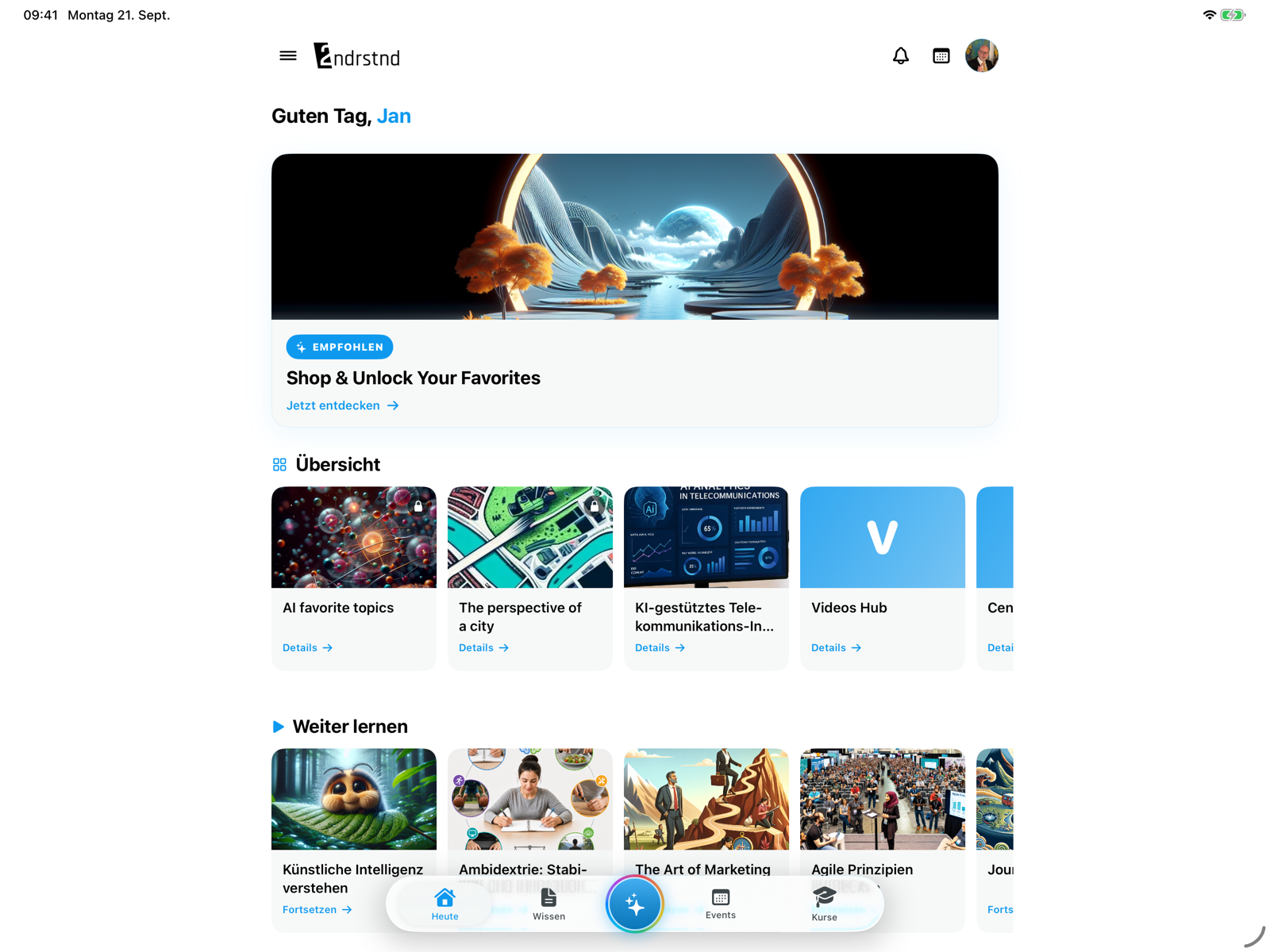
| Tab | Wofür |
|---|---|
| Heute | Ihr Start: Begrüßung, heutige Termine, „Weiter lernen", Ihre Merkliste, Empfehlungen. |
| Wissen | Die Bibliothek aller Inhalte — Artikel, Inhalte, Links, Übersichten, Sammlungen. Mit Filtern und Suche. |
| Events | Buchbare Termine, nach Zeit gruppiert („Jetzt live", „Nächste 7 Tage" …). Buchen und stornieren direkt in der App. |
| Kurse | Journey-Kurse mit Kapiteln, Lektionen und Quiz; Fortschritt und Abschluss. |
| Bryan | Die zentrale Taste: Bryan im Chat — und als Videoanruf mit sprechendem KI-Avatar. |
Oben auf „Heute" finden Sie das Menü Bereiche, die Benachrichtigungs-Glocke, den Kalender und Ihr Profil-Bild (Profil, Interessen, Abzeichen, Zertifikate, Einstellungen).
Lernen, Quiz, Artikel, Events und Bryan funktionieren wie im Web — die Details stehen in den jeweiligen Kapiteln dieses Handbuchs. Die App ist die mobile Ansicht derselben Plattform.
The app at a glance
Four tabs and the central Bryan button guide you through the app.
Four tabs along the bottom guide you through the app, with the Bryan button in the centre.
| Tab | What for |
|---|---|
| Heute (Today) | Your start: greeting, today's sessions, "continue learning", your bookmarks, recommendations. |
| Wissen (Knowledge) | The library of all content — articles, content, links, overviews, collections. With filters and search. |
| Events | Bookable sessions grouped by time ("live now", "next 7 days" …). Book and cancel right in the app. |
| Kurse (Courses) | Journey courses with chapters, lessons and quizzes; progress and completion. |
| Bryan | The central button: Bryan as a chat — and as a video call with a talking AI avatar. |
At the top of "Heute" you will find the Bereiche menu, the notification bell, the calendar and your profile picture (profile, interests, badges, certificates, settings).
Learning, quizzes, articles, events and Bryan work just like on the web — the details are in the respective chapters of this manual. The app is the mobile view of the same platform.
L'application en un coup d'œil
Quatre onglets et le bouton central Bryan vous guident dans l'application.
En bas de l'écran, quatre onglets structurent l'application, avec au centre le bouton Bryan.
| Onglet | À quoi ça sert |
|---|---|
| Heute | Votre point de départ : message de bienvenue, rendez-vous du jour, « Continuer l'apprentissage », votre liste de favoris, recommandations. |
| Savoir | La bibliothèque de tous les contenus — articles, contenus, liens, aperçus, collections. Avec filtres et recherche. |
| Événements | Rendez-vous réservables, regroupés par période (« En direct maintenant », « 7 prochains jours » …). Réservation et annulation directement dans l'application. |
| Cours | Cours Journey avec chapitres, leçons et quiz ; progression et achèvement. |
| Bryan | Le bouton central : Bryan en chat — et en appel vidéo avec un avatar IA parlant. |
En haut de « Heute », vous trouvez le menu Bereiche, la cloche des notifications, le calendrier et votre photo de profil (profil, centres d'intérêt, badges, certificats, paramètres).
L'apprentissage, les quiz, les articles, les événements et Bryan fonctionnent comme sur le Web — les détails figurent dans les chapitres correspondants de ce manuel. L'application est la vue mobile de la même plateforme.
Aplikacja w skrócie
Cztery zakładki i centralny przycisk Bryan prowadzą przez aplikację.
Na dole ekranu cztery zakładki prowadzą przez aplikację, a pośrodku znajduje się przycisk Bryan.
| Zakładka | Do czego |
|---|---|
| Heute | Państwa punkt startowy: powitanie, dzisiejsze terminy, „Kontynuuj naukę", lista zapisanych, rekomendacje. |
| Wiedza | Biblioteka wszystkich treści — artykuły, materiały, linki, przeglądy, kolekcje. Z filtrami i wyszukiwaniem. |
| Wydarzenia | Terminy do zarezerwowania, pogrupowane według czasu („Teraz na żywo", „Najbliższe 7 dni" …). Rezerwacja i anulowanie bezpośrednio w aplikacji. |
| Kursy | Kursy Journey z rozdziałami, lekcjami i quizami; postęp i ukończenie. |
| Bryan | Centralny przycisk: Bryan na czacie — oraz jako połączenie wideo z mówiącym awatarem AI. |
U góry w „Heute" znajdą Państwo menu Bereiche, dzwonek powiadomień, kalendarz oraz Państwa zdjęcie profilowe (profil, zainteresowania, odznaki, certyfikaty, ustawienia).
Nauka, quizy, artykuły, wydarzenia i Bryan działają tak jak w przeglądarce — szczegóły znajdują się w odpowiednich rozdziałach tego podręcznika. Aplikacja to mobilny widok tej samej platformy.
L'app in sintesi
Quattro schede e il pulsante centrale Bryan guidano attraverso l'app.
In basso quattro schede guidano attraverso l'app, al centro il pulsante Bryan.
| Scheda | A cosa serve |
|---|---|
| Heute | Il punto di partenza: benvenuto, appuntamenti di oggi, « Continua a imparare », l'elenco dei salvati, consigli. |
| Sapere | La biblioteca di tutti i contenuti — articoli, contenuti, link, panoramiche, raccolte. Con filtri e ricerca. |
| Eventi | Appuntamenti prenotabili, raggruppati per orario (« Ora in diretta », « Prossimi 7 giorni » …). Prenotazione e cancellazione direttamente nell'app. |
| Corsi | Corsi Journey con capitoli, lezioni e quiz; progresso e completamento. |
| Bryan | Il pulsante centrale: Bryan in chat — e come videochiamata con avatar IA parlante. |
In alto su « Heute » trova il menu Bereiche, la campanella delle notifiche, il calendario e la Sua immagine del profilo (profilo, interessi, badge, certificati, impostazioni).
Apprendimento, quiz, articoli, eventi e Bryan funzionano come sul Web — i dettagli si trovano nei rispettivi capitoli di questo manuale. L'app è la vista mobile della stessa piattaforma.
De app in het kort
Vier tabbladen en de centrale Bryan-knop leiden u door de app.
Onderaan leiden vier tabbladen door de app, in het midden de Bryan-knop.
| Tabblad | Waarvoor |
|---|---|
| Heute | Uw startpunt: begroeting, afspraken van vandaag, „Verder leren", uw bewaarlijst, aanbevelingen. |
| Kennis | De bibliotheek van alle inhoud — artikelen, inhoud, links, overzichten, collecties. Met filters en zoeken. |
| Evenementen | Boekbare afspraken, gegroepeerd op tijd („Nu live", „Komende 7 dagen" …). Boeken en annuleren direct in de app. |
| Cursussen | Journey-cursussen met hoofdstukken, lessen en quizzen; voortgang en afronding. |
| Bryan | De centrale knop: Bryan in de chat — en als videogesprek met sprekende AI-avatar. |
Bovenaan op „Heute" vindt u het menu Bereiche, de meldingsbel, de kalender en uw profielfoto (profiel, interesses, badges, certificaten, instellingen).
Leren, quizzen, artikelen, evenementen en Bryan werken net als op het web — de details staan in de betreffende hoofdstukken van dit handboek. De app is de mobiele weergave van hetzelfde platform.
Aplicația pe scurt
Patru file și butonul central Bryan vă ghidează prin aplicație.
În partea de jos, patru file vă ghidează prin aplicație, în mijloc butonul Bryan.
| Filă | Pentru ce |
|---|---|
| Heute | Punctul dumneavoastră de pornire: salut, programările de azi, „Continuă învățarea", lista dumneavoastră de salvate, recomandări. |
| Cunoștințe | Biblioteca tuturor conținuturilor — articole, conținuturi, linkuri, prezentări generale, colecții. Cu filtre și căutare. |
| Evenimente | Programări rezervabile, grupate după timp („Acum în direct", „Următoarele 7 zile" …). Rezervare și anulare direct în aplicație. |
| Cursuri | Cursuri Journey cu capitole, lecții și teste; progres și finalizare. |
| Bryan | Butonul central: Bryan în chat — și ca apel video cu avatar AI vorbitor. |
Sus, pe „Heute", găsiți meniul Bereiche, clopoțelul de notificări, calendarul și imaginea dumneavoastră de profil (profil, interese, insigne, certificate, setări).
Învățarea, testele, articolele, evenimentele și Bryan funcționează ca pe web — detaliile se află în capitolele respective ale acestui manual. Aplicația este vizualizarea mobilă a aceleiași platforme.
Η εφαρμογή με μια ματιά
Τέσσερις καρτέλες και το κεντρικό κουμπί Bryan σας καθοδηγούν στην εφαρμογή.
Στο κάτω μέρος, τέσσερις καρτέλες σας καθοδηγούν στην εφαρμογή, στο κέντρο το κουμπί Bryan.
| Καρτέλα | Για τι |
|---|---|
| Heute | Το σημείο εκκίνησής σας: καλωσόρισμα, σημερινά ραντεβού, «Συνέχεια μάθησης», η λίστα αποθηκευμένων σας, προτάσεις. |
| Γνώση | Η βιβλιοθήκη όλου του περιεχομένου — άρθρα, περιεχόμενα, σύνδεσμοι, επισκοπήσεις, συλλογές. Με φίλτρα και αναζήτηση. |
| Εκδηλώσεις | Ραντεβού προς κράτηση, ομαδοποιημένα κατά χρόνο («Τώρα ζωντανά», «Επόμενες 7 ημέρες» …). Κράτηση και ακύρωση απευθείας στην εφαρμογή. |
| Μαθήματα | Μαθήματα Journey με κεφάλαια, ενότητες και κουίζ· πρόοδος και ολοκλήρωση. |
| Bryan | Το κεντρικό κουμπί: ο Bryan στο chat — και ως βιντεοκλήση με ομιλούντα avatar AI. |
Επάνω στο «Heute» θα βρείτε το μενού Bereiche, το καμπανάκι ειδοποιήσεων, το ημερολόγιο και τη φωτογραφία προφίλ σας (προφίλ, ενδιαφέροντα, διακριτικά, πιστοποιητικά, ρυθμίσεις).
Η μάθηση, τα κουίζ, τα άρθρα, οι εκδηλώσεις και ο Bryan λειτουργούν όπως στο web — οι λεπτομέρειες βρίσκονται στα αντίστοιχα κεφάλαια αυτού του εγχειριδίου. Η εφαρμογή είναι η προβολή για κινητά της ίδιας πλατφόρμας.
نظرة عامة على التطبيق
تقودك أربع علامات تبويب وزر Bryan المركزي عبر التطبيق.
في الأسفل، تقودك أربع علامات تبويب عبر التطبيق، وفي الوسط زر Bryan.
| علامة التبويب | لماذا |
|---|---|
| Heute | نقطة البداية لديك: الترحيب، مواعيد اليوم، «متابعة التعلّم»، قائمة المحفوظات لديك، التوصيات. |
| المعرفة | مكتبة جميع المحتويات — المقالات، المحتويات، الروابط، النظرات العامة، المجموعات. مع عوامل التصفية والبحث. |
| الفعاليات | مواعيد قابلة للحجز، مجمّعة حسب الوقت («مباشر الآن»، «الأيام السبعة القادمة» …). الحجز والإلغاء مباشرةً في التطبيق. |
| الدورات | دورات Journey مع الفصول والدروس والاختبارات؛ التقدّم والإتمام. |
| Bryan | الزر المركزي: Bryan في الدردشة — وكـمكالمة فيديو مع أفاتار ذكاء اصطناعي ناطق. |
في الأعلى على «Heute» تجد قائمة Bereiche، وجرس الإشعارات، والتقويم، وصورة ملفك الشخصي (الملف الشخصي، الاهتمامات، الشارات، الشهادات، الإعدادات).
التعلّم والاختبارات والمقالات والفعاليات وBryan تعمل كما في الويب — تجد التفاصيل في الفصول المعنية من هذا الدليل. التطبيق هو العرض المحمول لنفس المنصة.
应用概览
四个标签页和中央的 Bryan 按钮引导您使用应用。
底部有四个标签页引导您使用应用,中间是 Bryan 按钮。
| 标签页 | 用途 |
|---|---|
| Heute | 您的起点:欢迎语、今日日程、“继续学习”、您的收藏列表、推荐内容。 |
| 知识 | 所有内容的资料库——文章、内容、链接、概览、合集。带筛选和搜索功能。 |
| 活动 | 可预订的日程,按时间分组(“正在直播”、“未来 7 天”……)。可直接在应用中预订和取消。 |
| 课程 | 带章节、课时和测验的 Journey 课程;进度与完成。 |
| Bryan | 中央按钮:在聊天中使用 Bryan——以及作为带有会说话的 AI 虚拟形象的视频通话。 |
在“Heute”顶部,您可以找到Bereiche菜单、通知铃铛、日历以及您的头像(个人资料、兴趣、徽章、证书、设置)。
学习、测验、文章、活动和 Bryan 的使用方式与网页版相同——详细信息请参见本手册的相应章节。应用是同一平台的移动视图。