Die Bibliothek
Ihr Zuhause in INTERVIEWER: alle iDocs des Arbeitsbereichs — suchen, filtern, sortieren und neue Inhalte hereinholen.
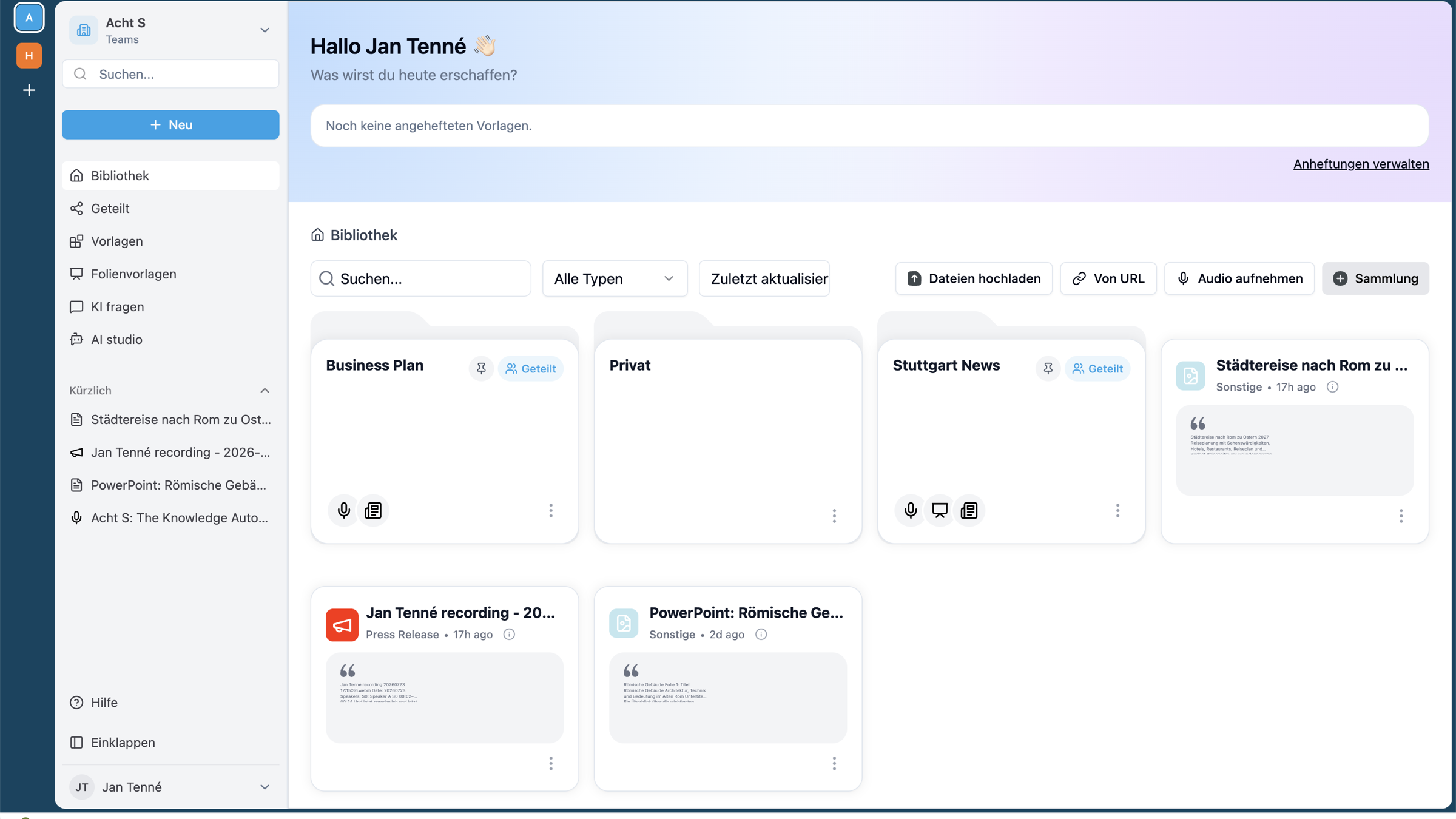
Was Sie hier sehen
Die Bibliothek zeigt alle iDocs des aktuellen Arbeitsbereichs als Karten — mit Titel, Typ, Alter und einer kurzen Vorschau. Über Dokumentdetails und Aktionen auf jeder Karte kommen Sie an Details und Befehle.
Finden & sortieren
| Werkzeug | Wofür |
|---|---|
| Suche | Volltextsuche über Ihre iDocs. |
| Alle Typen | Nach Dokumenttyp filtern (also nach Vorlage). |
| Zuletzt aktualisiert | Sortierung ändern. |
| Sammlung | iDocs zu einer Sammlung bündeln — praktisch, um später gezielt KI fragen darauf anzuwenden. |
Neues Wissen hereinholen
Direkt in der Bibliothek stehen drei Wege bereit, aus denen sofort ein iDoc entsteht:
Dokumente als Ausgangsmaterial.
Eine Web-Quelle einlesen.
Direkt sprechen — die Aufnahme wird transkribiert.
Alternativ starten Sie über Neu oder eine angeheftete Vorlage auf der Startseite.
Audio ist der schnellste Weg, Wissen aus dem Kopf zu holen: aufnehmen, anhören, Aufnahme verwenden — den Rest übernimmt die Vorlage.
Verwandtes
The library
Your home base in INTERVIEWER: all iDocs of the workspace — search, filter, sort and bring in new material.
What you see here
The Library shows all iDocs of the current workspace as cards — with title, type, age and a short preview. Document details and Actions on each card lead to details and commands.
Finding & sorting
| Tool | What for |
|---|---|
| Search | Full-text search across your iDocs. |
| All types | Filter by document type (that is, by template). |
| Last updated | Change the sort order. |
| Collection | Bundle iDocs into a collection — handy for applying Ask AI to them later. |
Bringing in new knowledge
Right in the library three routes are available, each producing an iDoc immediately:
Documents as source material.
Read in a web source.
Just speak — the recording is transcribed.
Alternatively start via New or a pinned template on the home page.
Audio is the fastest route to get knowledge out of your head: record, listen, Use recording — the template does the rest.
Related
La Bibliothek
Votre point d'ancrage dans INTERVIEWER : tous les iDocs de l'Arbeitsbereich — chercher, filtrer, trier et importer de nouveaux contenus.
Ce que vous voyez ici
La Bibliothek affiche tous les iDocs de l'Arbeitsbereich actuel sous forme de cartes — avec titre, type, ancienneté et un court aperçu. Via Détails du document et Actions sur chaque carte, vous accédez aux détails et aux commandes.
Trouver & trier
| Outil | À quoi ça sert |
|---|---|
| Recherche | Recherche plein texte dans vos iDocs. |
| Tous les types | Filtrer par type de document (c'est-à-dire par Vorlage). |
| Mis à jour récemment | Modifier le tri. |
| Collection | Regrouper des iDocs en une collection — pratique pour y appliquer ensuite de façon ciblée KI fragen. |
Importer de nouvelles connaissances
Directement dans la Bibliothek, trois voies sont disponibles, dont chacune produit immédiatement un iDoc :
Des documents comme matériau de départ.
Lire une source web.
Parler directement — l'enregistrement est transcrit.
Vous pouvez aussi démarrer via Nouveau ou une Vorlage épinglée sur la page d'accueil.
L'audio est le moyen le plus rapide de sortir les connaissances de votre tête : enregistrer, écouter, Utiliser l'enregistrement — la Vorlage se charge du reste.
En lien
Bibliothek
Twój dom w INTERVIEWER: wszystkie iDocs obszaru roboczego — wyszukiwanie, filtrowanie, sortowanie i wprowadzanie nowych treści.
Co tu widzisz
Bibliothek pokazuje wszystkie iDocs bieżącego obszaru roboczego jako karty — z tytułem, typem, wiekiem i krótkim podglądem. Przez Szczegóły dokumentu i Akcje na każdej karcie docierasz do szczegółów i poleceń.
Znajdowanie i sortowanie
| Narzędzie | Do czego |
|---|---|
| Szukaj | Wyszukiwanie pełnotekstowe w Twoich iDocs. |
| Wszystkie typy | Filtrowanie według typu dokumentu (czyli według szablonu). |
| Ostatnio zaktualizowane | Zmiana sortowania. |
| Kolekcja | Grupowanie iDocs w kolekcję — praktyczne, aby później celowo zastosować na niej KI fragen. |
Wprowadzanie nowej wiedzy
Bezpośrednio w Bibliothek dostępne są trzy drogi, z których od razu powstaje iDoc:
Dokumenty jako materiał wyjściowy.
Wczytaj źródło internetowe.
Po prostu mów — nagranie zostaje przetranskrybowane.
Alternatywnie zaczynasz przez Nowy lub przypięty szablon na stronie startowej.
Audio to najszybsza droga, by wydobyć wiedzę z głowy: nagraj, przesłuchaj, Użyj nagrania — resztę przejmuje szablon.
Powiązane
La Bibliothek
La sua casa in INTERVIEWER: tutti gli iDoc dell'area di lavoro — cercare, filtrare, ordinare e importare nuovi contenuti.
Cosa vede qui
La Bibliothek mostra tutti gli iDoc dell'area di lavoro corrente come schede — con titolo, tipo, età e una breve anteprima. Tramite Dettagli documento e Azioni su ciascuna scheda accede a dettagli e comandi.
Trovare & ordinare
| Strumento | A cosa serve |
|---|---|
| Ricerca | Ricerca full-text sui suoi iDoc. |
| Tutti i tipi | Filtrare per tipo di documento (ovvero per Vorlage). |
| Aggiornati di recente | Modificare l'ordinamento. |
| Sammlung | Raggruppare iDoc in una Sammlung — pratico per applicarvi poi in modo mirato KI fragen. |
Importare nuova conoscenza
Direttamente nella Bibliothek sono disponibili tre modi da cui nasce subito un iDoc:
Documenti come materiale di partenza.
Leggere una fonte web.
Parlare direttamente — la registrazione viene trascritta.
In alternativa avvia tramite Nuovo o una Vorlage fissata nella pagina iniziale.
L'audio è il modo più rapido per estrarre la conoscenza dalla mente: registrare, ascoltare, Usa registrazione — al resto pensa la Vorlage.
Correlati
De Bibliothek
Uw thuis in INTERVIEWER: alle iDocs van de Arbeitsbereich — zoeken, filteren, sorteren en nieuwe inhoud binnenhalen.
Wat u hier ziet
De Bibliothek toont alle iDocs van de huidige Arbeitsbereich als kaarten — met titel, type, leeftijd en een korte voorvertoning. Via Documentdetails en Acties op elke kaart komt u bij details en commando's.
Vinden & sorteren
| Gereedschap | Waarvoor |
|---|---|
| Zoeken | Volledig-tekstzoeken door uw iDocs. |
| Alle typen | Filteren op documenttype (dus op Vorlage). |
| Laatst bijgewerkt | Sortering wijzigen. |
| Sammlung | iDocs bundelen tot een Sammlung — handig om later gericht KI fragen daarop toe te passen. |
Nieuwe kennis binnenhalen
Rechtstreeks in de Bibliothek staan drie manieren klaar waaruit direct een iDoc ontstaat:
Documenten als uitgangsmateriaal.
Een webbron inlezen.
Direct spreken — de opname wordt getranscribeerd.
Als alternatief start u via Nieuw of een vastgemaakte Vorlage op de startpagina.
Audio is de snelste manier om kennis uit uw hoofd te halen: opnemen, beluisteren, Opname gebruiken — de rest neemt de Vorlage over.
Gerelateerd
Bibliothek
Casa dumneavoastră în INTERVIEWER: toate iDoc-urile Arbeitsbereich-ului — căutare, filtrare, sortare și aducerea de conținut nou.
Ce vedeți aici
Bibliothek arată toate iDoc-urile Arbeitsbereich-ului curent sub formă de carduri — cu titlu, tip, vechime și o scurtă previzualizare. Prin Detalii document și Acțiuni pe fiecare card ajungeți la detalii și comenzi.
Găsire & sortare
| Instrument | Pentru ce |
|---|---|
| Căutare | Căutare full-text în iDoc-urile dumneavoastră. |
| Toate tipurile | Filtrare după tipul de document (deci după șablon). |
| Actualizat ultima dată | Modificarea sortării. |
| Sammlung | Gruparea iDoc-urilor într-o Sammlung — practic pentru a aplica ulterior țintit KI fragen asupra ei. |
Aducerea de cunoștințe noi
Direct în Bibliothek stau disponibile trei căi din care ia naștere imediat un iDoc:
Documente ca material de plecare.
Citirea unei surse web.
Vorbiți direct — înregistrarea este transcrisă.
Alternativ porniți prin Nou sau un șablon fixat pe pagina de start.
Audio este cea mai rapidă cale de a scoate cunoștințele din cap: înregistrați, ascultați, Folosește înregistrarea — restul îl preia șablonul.
Înrudite
Η βιβλιοθήκη
Το σπίτι σας στον INTERVIEWER: όλα τα iDocs του χώρου εργασίας — αναζήτηση, φιλτράρισμα, ταξινόμηση και εισαγωγή νέου περιεχομένου.
Τι βλέπετε εδώ
Η βιβλιοθήκη εμφανίζει όλα τα iDocs του τρέχοντος χώρου εργασίας ως κάρτες — με τίτλο, τύπο, ηλικία και μια σύντομη προεπισκόπηση. Μέσω λεπτομερειών εγγράφου και ενεργειών σε κάθε κάρτα φτάνετε σε λεπτομέρειες και εντολές.
Εύρεση & ταξινόμηση
| Εργαλείο | Για τι |
|---|---|
| Αναζήτηση | Αναζήτηση πλήρους κειμένου στα iDocs σας. |
| Όλοι οι τύποι | Φιλτράρισμα κατά τύπο εγγράφου (δηλαδή κατά πρότυπο). |
| Τελευταία ενημέρωση | Αλλαγή ταξινόμησης. |
| Συλλογή | Ομαδοποίηση iDocs σε μια συλλογή — πρακτικό για να εφαρμόσετε αργότερα στοχευμένα ερωτήσεις στην ΤΝ επάνω τους. |
Εισαγωγή νέας γνώσης
Απευθείας στη βιβλιοθήκη διατίθενται τρεις τρόποι από τους οποίους δημιουργείται αμέσως ένα iDoc:
Έγγραφα ως αρχικό υλικό.
Ανάγνωση μιας διαδικτυακής πηγής.
Μιλήστε απευθείας — η ηχογράφηση απομαγνητοφωνείται.
Εναλλακτικά ξεκινάτε μέσω Νέο ή ενός καρφιτσωμένου προτύπου στην αρχική σελίδα.
Ο ήχος είναι ο ταχύτερος τρόπος για να εξάγετε γνώση από το μυαλό: ηχογραφήστε, ακούστε, χρήση ηχογράφησης — τα υπόλοιπα τα αναλαμβάνει το πρότυπο.
Σχετικά
المكتبة
موطنك في INTERVIEWER: كل iDocs الخاصة بمساحة العمل — بحث وتصفية وفرز وجلب محتوى جديد.
ما تراه هنا
تُظهر Bibliothek كل iDocs في مساحة العمل الحالية كبطاقات — بالعنوان والنوع والعمر ومعاينة قصيرة. عبر تفاصيل المستند والإجراءات على كل بطاقة تصل إلى التفاصيل والأوامر.
البحث & الفرز
| الأداة | لماذا |
|---|---|
| البحث | بحث نصي كامل عبر iDocs الخاصة بك. |
| كل الأنواع | التصفية حسب نوع المستند (أي حسب القالب). |
| آخر تحديث | تغيير الفرز. |
| المجموعة | تجميع iDocs في مجموعة — عملي لتطبيق KI fragen عليها لاحقاً بشكل مقصود. |
جلب معرفة جديدة
مباشرة في المكتبة تتوفر ثلاث طرق ينشأ منها iDoc فوراً:
مستندات كمادة انطلاق.
قراءة مصدر ويب.
تحدّث مباشرة — يُفرَّغ التسجيل نصّياً.
بدلاً من ذلك تبدأ عبر Neu أو قالب مثبّت على الصفحة الرئيسية.
الصوت هو أسرع طريق لإخراج المعرفة من الرأس: سجّل، استمع، استخدام التسجيل — والباقي يتولّاه القالب.
ذات صلة
Bibliothek
您在 INTERVIEWER 中的家:工作区的所有 iDoc——搜索、筛选、排序,并把新内容纳入进来。
您在此处所见
Bibliothek 以卡片形式展示当前工作区的所有 iDoc——含标题、类型、时长和简短预览。通过每张卡片上的文档详情和操作,您可以获取详情和命令。
查找 & 排序
| 工具 | 用途 |
|---|---|
| 搜索 | 对您的 iDoc 进行全文搜索。 |
| 所有类型 | 按文档类型(即按 Vorlage)筛选。 |
| 最近更新 | 更改排序方式。 |
| Sammlung | 将 iDoc 归集为一个 Sammlung——便于日后有针对性地对其使用 KI fragen。 |
纳入新知识
在 Bibliothek 中直接提供三种途径,可立即由此生成一个 iDoc:
以文档作为原始材料。
读入一个网页来源。
直接讲述——录音会被转录。
或者,您也可以通过 新建 或首页上一个被固定的模板来开始。
音频是最快的途径,可将脑中的知识提取出来:录制、试听、使用录音——其余的交给 Vorlage。
相关内容
- 您的第一个 iDoc · 界面