Die Landkarte der App
CAMPUS hat drei Bereiche. Zu wissen, in welchem Sie sich gerade befinden, spart im Alltag viel Sucherei — und erklärt, warum manche Funktionen nur an bestimmten Stellen auftauchen.
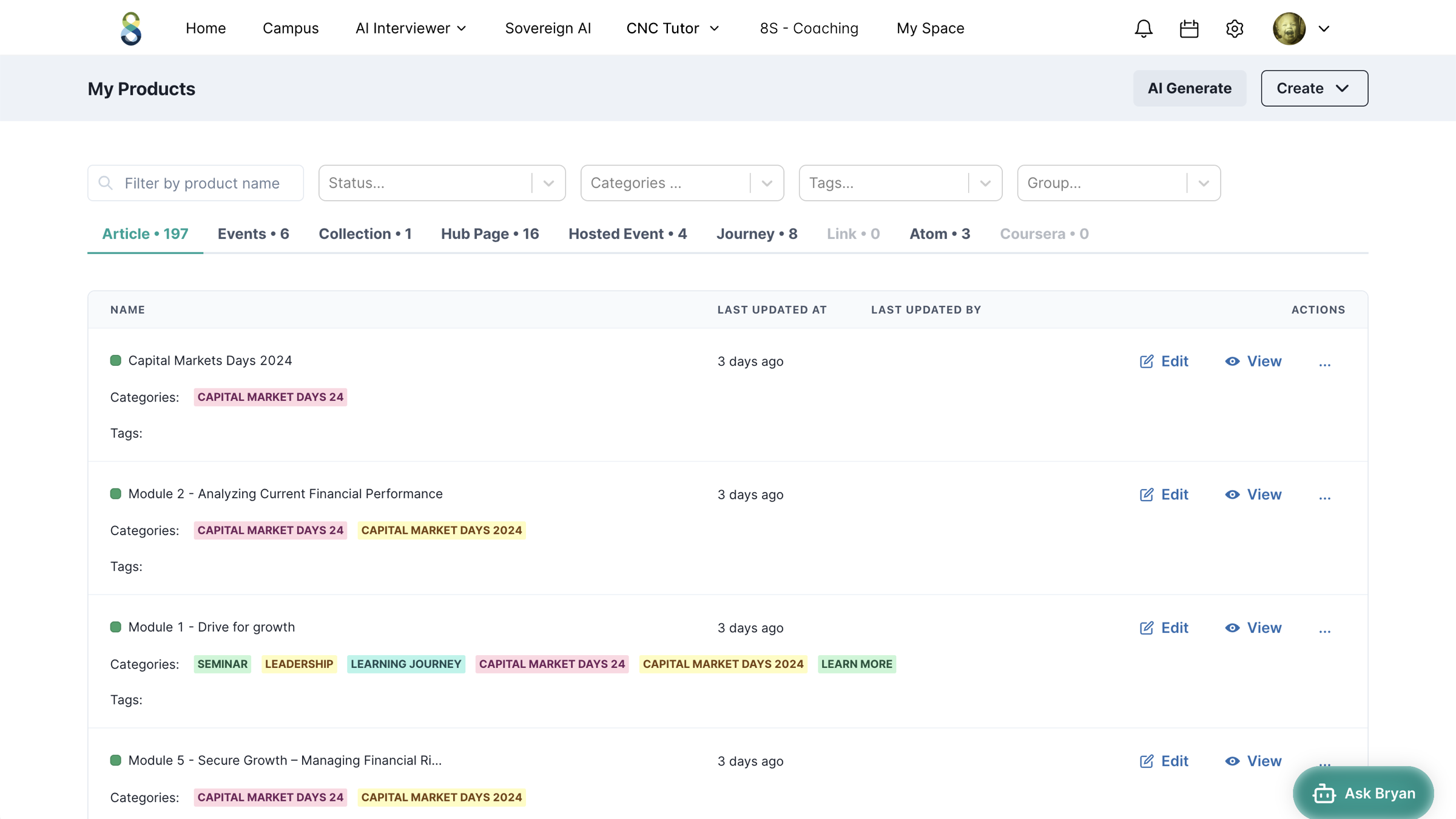
Was Nutzer sehen: Startseite, Inhalte (Products), Suche, Chat, Kalender, Profil. Editoren bearbeiten hier direkt über den Edit-Mode.
Die Steuerzentrale hinter dem Zahnrad oben rechts: Inhalte, Nutzer, Reward-System, Design und alle Einstellungen — übersichtlich in Kacheln gruppiert.
Die KI-Dokumentenwerkstatt. Erzeugt strukturierte iDocs, die als Inhalte in CAMPUS einfließen. Eigenes INTERVIEWER-Handbuch.
Der KI-Avatar unten rechts beantwortet Fragen rund um die Uhr — auf Basis der hinterlegten Wissensquellen. Verfügbar in allen Bereichen.
So orientieren Sie sich
Ein einfacher Merksatz: Alles, was Nutzer erleben, liegt unter /campus. Alles, was Sie einrichten, liegt hinter dem Zahnrad unter /easy-cms. Der Wechsel zwischen beiden erfolgt über das Zahnrad-Symbol (Einstellungen) und das Schließen-Kreuz.
Die URL in der Adresszeile verrät Ihnen jederzeit, wo Sie sind. /easy-cms = Verwaltung, /campus/product/… = eine Inhaltsseite, /interviewer = Dokumentenwerkstatt.
Als Nächstes: die Kernbegriffe, die Ihnen überall begegnen.
The map of the app
CAMPUS has three areas. Knowing which one you are currently in saves a lot of hunting around — and explains why some features only appear in certain places.
What users see: home page, content (products), search, chat, calendar, profile. Editors edit here directly via the edit mode.
The control centre behind the gear at the top right: content, users, reward system, design and all settings — neatly grouped into tiles.
The AI document workshop. Produces structured iDocs that flow into CAMPUS as content. Its own INTERVIEWER manual.
The AI avatar at the bottom right answers questions around the clock — based on the configured knowledge sources. Available in every area.
How to orient yourself
A simple rule of thumb: everything users experience lives under /campus. Everything you set up lives behind the gear under /easy-cms. You switch between the two via the gear icon (settings) and the close cross.
The URL in the address bar always tells you where you are. /easy-cms = administration, /campus/product/… = a content page, /interviewer = document workshop.
Next: the core concepts you will meet everywhere.
La carte de l'app
CAMPUS comporte trois zones. Savoir dans laquelle vous vous trouvez fait gagner beaucoup de temps de recherche au quotidien — et explique pourquoi certaines fonctions n'apparaissent qu'à des endroits précis.
Ce que voient les utilisateurs : page d'accueil, contenus (Products), recherche, chat, calendrier, profil. Les éditeurs modifient ici directement via l'Edit-Mode.
Le centre de commande derrière la roue dentée en haut à droite : contenus, utilisateurs, système de Reward, design et tous les paramètres — clairement groupés en tuiles.
L'atelier de documents IA. Génère des iDocs structurés qui alimentent les contenus dans CAMPUS. Son propre manuel INTERVIEWER.
L'avatar IA en bas à droite répond aux questions 24h/24 — sur la base des sources de savoir enregistrées. Disponible dans toutes les zones.
Comment vous repérer
Un repère simple : tout ce que les utilisateurs vivent se trouve sous /campus. Tout ce que vous configurez se trouve derrière la roue dentée sous /easy-cms. Le passage entre les deux se fait via l'icône en roue dentée (paramètres) et la croix de fermeture.
L'URL dans la barre d'adresse vous indique à tout moment où vous êtes. /easy-cms = administration, /campus/product/… = une page de contenu, /interviewer = atelier de documents.
Ensuite : les termes clés que vous croisez partout.
Mapa aplikacji
CAMPUS ma trzy obszary. Wiedza o tym, w którym z nich się właśnie znajdujesz, oszczędza w codziennej pracy dużo szukania — i wyjaśnia, dlaczego niektóre funkcje pojawiają się tylko w określonych miejscach.
To, co widzą użytkownicy: strona startowa, treści (Products), wyszukiwarka, czat, kalendarz, profil. Edytorzy edytują tutaj bezpośrednio przez Edit-Mode.
Centrala sterowania za kołem zębatym w prawym górnym rogu: treści, użytkownicy, Reward-System, projekt graficzny i wszystkie ustawienia — przejrzyście pogrupowane w kafelkach.
Warsztat dokumentów AI. Tworzy ustrukturyzowane iDocs, które trafiają jako treści do CAMPUS. Własny podręcznik INTERVIEWER.
Awatar AI w prawym dolnym rogu odpowiada na pytania przez całą dobę — na podstawie zapisanych źródeł wiedzy. Dostępny we wszystkich obszarach.
Jak się orientować
Prosta zasada: Wszystko, czego użytkownicy doświadczają, leży pod /campus. Wszystko, co konfigurujesz, leży za kołem zębatym pod /easy-cms. Przełączanie między nimi odbywa się przez ikonę koła zębatego (Ustawienia) i krzyżyk zamknięcia.
Adres URL w pasku adresu w każdej chwili zdradza, gdzie jesteś. /easy-cms = administracja, /campus/product/… = strona treści, /interviewer = warsztat dokumentów.
Następnie: pojęcia kluczowe, które napotkasz wszędzie.
La mappa dell'app
CAMPUS ha tre aree. Sapere in quale ci si trova in un dato momento fa risparmiare molte ricerche nella quotidianità — e spiega perché alcune funzioni compaiono solo in determinati punti.
Ciò che gli utenti vedono: home, contenuti (Products), ricerca, chat, calendario, profilo. Gli editori modificano qui direttamente tramite l'Edit-Mode.
La centrale di comando dietro l'ingranaggio in alto a destra: contenuti, utenti, Reward-System, design e tutte le impostazioni — raggruppate in modo chiaro in riquadri.
Il laboratorio di documenti con IA. Genera iDocs strutturati che confluiscono come contenuti in CAMPUS. Ha un proprio manuale INTERVIEWER.
L'avatar IA in basso a destra risponde alle domande 24 ore su 24 — sulla base delle fonti di conoscenza memorizzate. Disponibile in tutte le aree.
Come orientarsi
Una semplice regola mnemonica: tutto ciò che gli utenti vivono si trova sotto /campus. Tutto ciò che lei configura si trova dietro l'ingranaggio sotto /easy-cms. Il passaggio tra i due avviene tramite l'icona a ingranaggio (impostazioni) e la crocetta di chiusura.
L'URL nella barra degli indirizzi le rivela in ogni momento dove si trova. /easy-cms = amministrazione, /campus/product/… = una pagina di contenuto, /interviewer = laboratorio di documenti.
Come prossimo passo: i concetti chiave che incontra ovunque.
De landkaart van de app
CAMPUS heeft drie gebieden. Weten in welk gebied u zich bevindt, bespaart in de praktijk veel zoekwerk — en verklaart waarom sommige functies alleen op bepaalde plekken opduiken.
Wat gebruikers zien: startpagina, inhoud (Products), zoeken, chat, kalender, profiel. Editors bewerken hier direct via de Edit-Mode.
De besturingscentrale achter het tandwiel rechtsboven: inhoud, gebruikers, Reward-systeem, ontwerp en alle instellingen — overzichtelijk gegroepeerd in tegels.
De AI-documentenwerkplaats. Genereert gestructureerde iDocs die als inhoud in CAMPUS terechtkomen. Eigen INTERVIEWER-handboek.
De AI-avatar rechtsonder beantwoordt vragen de klok rond — op basis van de opgeslagen kennisbronnen. Beschikbaar in alle gebieden.
Zo oriënteert u zich
Een eenvoudige geheugensteun: alles wat gebruikers beleven, staat onder /campus. Alles wat u inricht, staat achter het tandwiel onder /easy-cms. Het wisselen tussen beide gebeurt via het tandwielsymbool (Instellingen) en het sluitkruis.
De URL in de adresbalk verraadt u op elk moment waar u bent. /easy-cms = beheer, /campus/product/… = een inhoudspagina, /interviewer = documentenwerkplaats.
Als volgende: de kernbegrippen die u overal tegenkomt.
Harta aplicației
CAMPUS are trei domenii. Să știți în care vă aflați chiar acum vă scutește de multă căutare în activitatea zilnică — și explică de ce unele funcții apar doar în anumite locuri.
Ce văd utilizatorii: pagina de start, conținut (Products), căutare, chat, calendar, profil. Editorii editează aici direct prin Edit-Mode.
Centrul de comandă din spatele roții dințate sus dreapta: conținut, utilizatori, Reward-System, design și toate setările — grupate clar în dale.
Atelierul de documente AI. Generează iDocs structurate, care intră ca conținut în CAMPUS. Manual INTERVIEWER propriu.
Avatarul AI din dreapta jos răspunde la întrebări non-stop — pe baza surselor de cunoștințe stocate. Disponibil în toate domeniile.
Cum vă orientați
O regulă simplă de memorat: Tot ce experimentează utilizatorii se află sub /campus. Tot ce configurați dvs. se află în spatele roții dințate sub /easy-cms. Comutarea între cele două se face prin simbolul roții dințate (Setări) și crucea de închidere.
URL-ul din bara de adrese vă dezvăluie oricând unde vă aflați. /easy-cms = administrare, /campus/product/… = o pagină de conținut, /interviewer = atelier de documente.
În continuare: termenii-cheie, pe care îi întâlniți peste tot.
Ο χάρτης της εφαρμογής
Το CAMPUS έχει τρεις περιοχές. Το να γνωρίζετε σε ποια βρίσκεστε κάθε στιγμή σας γλιτώνει πολύ ψάξιμο στην καθημερινότητα — και εξηγεί γιατί ορισμένες λειτουργίες εμφανίζονται μόνο σε συγκεκριμένα σημεία.
Ό,τι βλέπουν οι χρήστες: αρχική σελίδα, περιεχόμενα (Products), αναζήτηση, chat, ημερολόγιο, προφίλ. Οι Editors επεξεργάζονται εδώ απευθείας μέσω του Edit-Mode.
Το κέντρο ελέγχου πίσω από το γρανάζι επάνω δεξιά: περιεχόμενα, χρήστες, σύστημα Reward, σχεδίαση και όλες οι ρυθμίσεις — οργανωμένα με σαφήνεια σε πλακίδια.
Το εργαστήριο εγγράφων με AI. Παράγει δομημένα iDocs, τα οποία ενσωματώνονται ως περιεχόμενα στο CAMPUS. Δικό του εγχειρίδιο INTERVIEWER.
Το άβαταρ AI κάτω δεξιά απαντά σε ερωτήσεις όλο το εικοσιτετράωρο — με βάση τις αποθηκευμένες πηγές γνώσης. Διαθέσιμο σε όλες τις περιοχές.
Έτσι προσανατολίζεστε
Ένας απλός κανόνας μνήμης: Ό,τι βιώνουν οι χρήστες βρίσκεται κάτω από το /campus. Ό,τι ρυθμίζετε εσείς βρίσκεται πίσω από το γρανάζι κάτω από το /easy-cms. Η εναλλαγή μεταξύ των δύο γίνεται μέσω του εικονιδίου γραναζιού (Ρυθμίσεις) και του σταυρού κλεισίματος.
Το URL στη γραμμή διευθύνσεων σας αποκαλύπτει ανά πάσα στιγμή πού βρίσκεστε. /easy-cms = διαχείριση, /campus/product/… = μια σελίδα περιεχομένου, /interviewer = εργαστήριο εγγράφων.
Στη συνέχεια: οι Βασικοί όροι, που θα συναντάτε παντού.
خريطة التطبيق
يتكوّن CAMPUS من ثلاثة مجالات. معرفة أيّها أنت فيه الآن يوفّر الكثير من عناء البحث في العمل اليومي — ويفسّر لماذا تظهر بعض الوظائف في مواضع بعينها فقط.
ما يراه المستخدمون: الصفحة الرئيسية، والمحتوى (Products)، والبحث، والدردشة، والتقويم، والملف الشخصي. يحرّر المحرّرون هنا مباشرةً عبر Edit-Mode.
مركز التحكم خلف الترس أعلى اليمين: المحتوى، والمستخدمون، ونظام Reward، والتصميم، وكل الإعدادات — مجمّعة بوضوح في بطاقات.
ورشة المستندات بالذكاء الاصطناعي. تُنتج iDocs منظّمة تتدفق بوصفها محتوى في CAMPUS. دليل INTERVIEWER الخاص به.
يجيب أفاتار الذكاء الاصطناعي أسفل اليمين عن الأسئلة على مدار الساعة — استنادًا إلى مصادر المعرفة المخزَّنة. متاح في كل المجالات.
كيف تتوجّه
قاعدة تذكّر بسيطة: كل ما يعيشه المستخدمون يقع تحت /campus. وكل ما تُعِدّه أنت يقع خلف الترس تحت /easy-cms. يتم التبديل بينهما عبر رمز الترس (الإعدادات) وعلامة الإغلاق.
يكشف لك عنوان URL في شريط العنوان أينما كنت في أي وقت. /easy-cms = الإدارة، /campus/product/… = صفحة محتوى، /interviewer = ورشة المستندات.
التالي: المصطلحات الأساسية التي ستصادفها في كل مكان.
App 地图
CAMPUS 有三个区域。知道自己当前身处哪个区域,能在日常中省去大量摸索——也解释了为何某些功能只在特定位置出现。
用户所见:首页、内容(Products)、搜索、聊天、日历、个人资料。编辑者在此通过 Edit-Mode 直接编辑。
右上角齿轮背后的控制中心:内容、用户、Reward 系统、设计和所有设置——以卡片清晰分组。
右下角的 AI 头像全天候回答问题——基于已存储的知识来源。在所有区域可用。
如何定位自己
一个简单的口诀:凡是用户体验到的,都在 /campus 下。凡是您设置的,都在齿轮背后的 /easy-cms 下。 两者之间通过齿轮图标(设置)和关闭叉切换。
地址栏里的 URL 随时告诉您所在的位置。/easy-cms = 管理,/campus/product/… = 一个内容页面,/interviewer = 文档工坊。
接下来:随处都会遇到的核心概念。