Navigation & Startseite
So ist CAMPUS aufgebaut: die Startseite als Einstieg, die obere Navigation für Themen und die System-Symbole für Suche, Chat, Kalender und mehr. Wichtig zu wissen: Ihre Ansicht ist individuell.
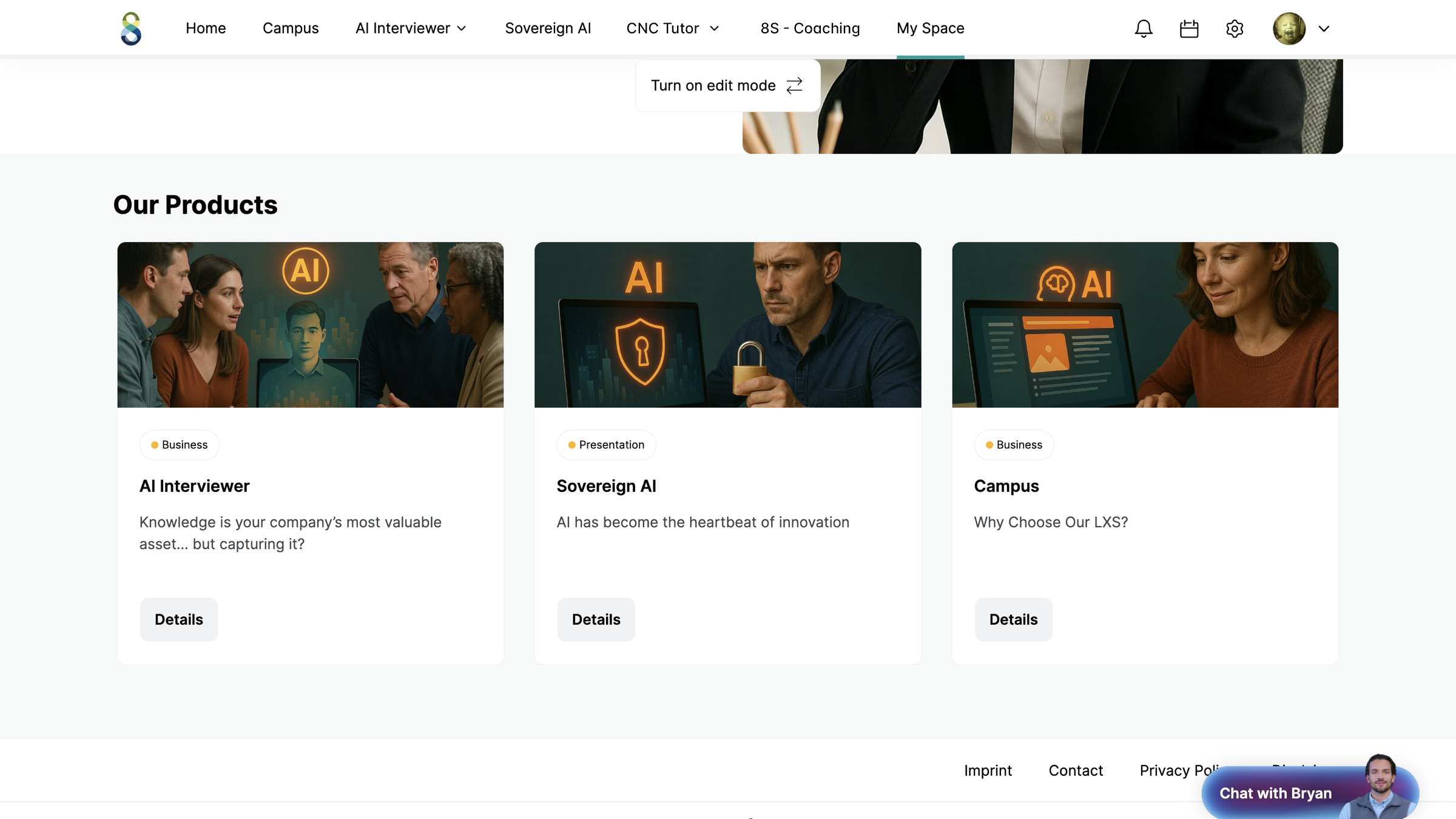
Die Startseite
Nach der Anmeldung landen Sie auf einer kuratierten Startseite, die Ihre Organisation zusammengestellt hat: empfohlene Inhalte, laufende Journeys, kommende Events, Quizze und mehr. Sie ist personalisiert — Sie sehen bevorzugt, was zu Ihnen passt.
Obere Navigation
Die Menüpunkte oben (z. B. Coaching, Events oder eigene Themenbereiche) sind von Ihrer Organisation angelegt und führen zu Themenwelten oder wichtigen Seiten.
Ihre Ansicht ist individuell. Welche Menüpunkte — und sogar welche System-Symbole — Sie sehen, steuert Ihre Organisation über Restrictions. Deshalb kann CAMPUS bei Kolleg:innen anders aussehen als bei Ihnen. Fehlt Ihnen etwas, das jemand anders hat, ist es vermutlich für Ihre Rolle/Group ausgeblendet.
Die System-Symbole (oben rechts)
| Symbol | Funktion |
|---|---|
| 🔍 Suche | Volltext- und KI-Suche über alle Inhalte |
| 🔔 Benachrichtigungen | Neuigkeiten, Erinnerungen, Freigaben |
| 💬 Chat | Nachrichten an andere Nutzer (Messenger) |
| 📅 Kalender | Ihre Termine, Sessions und Buchungen |
| ⚙️ Einstellungen | Nur für Admins/Editoren sichtbar (Verwaltung) |
| 🙂 Profil | Ihre persönlichen Bereiche (siehe Anmelden & Profil) |
Ganz unten rechts schwebt Ask Bryan — Ihr KI-Assistent, überall erreichbar. Mehr unter Ask Bryan.
So finden Sie sich zurecht
- Startseite für den kuratierten Einstieg.
- Suche für gezieltes Finden, Bryan für Fragen.
- Profilmenü für Ihre Journeys, Buchungen, Bookmarks und Rewards.
Troubleshooting
Ein Menüpunkt/Symbol, das Kolleg:innen haben, fehlt bei mir.
Das ist eine Restriction — bewusst so für Ihre Rolle/Group. Wenden Sie sich bei Bedarf ans Team.
Ich finde die Startseite nicht wieder.
Über das Logo oben links gelangen Sie zurück zum Einstieg.
Verwandtes
Weiter: Suche & KI-Suche.
Navigation & home page
How CAMPUS is laid out: the home page as your entry point, the top navigation for topics, and the system icons for search, chat, calendar and more. Important to know: your view is individual.
The home page
After signing in you land on a curated home page your organisation has put together: recommended content, ongoing journeys, upcoming events, quizzes and more. It is personalised — you preferentially see what suits you.
Top navigation
The menu items at the top (e.g. Coaching, Events or your own topic areas) are created by your organisation and lead to topic worlds or important pages.
Your view is individual. Which menu items — and even which system icons — you see is controlled by your organisation via restrictions. That is why CAMPUS may look different for colleagues than for you. If something is missing that someone else has, it is probably hidden for your role/group.
The system icons (top right)
| Icon | Function |
|---|---|
| 🔍 Search | Full-text and AI search across all content |
| 🔔 Notifications | News, reminders, approvals |
| 💬 Chat | Messages to other users (messenger) |
| 📅 Calendar | Your appointments, sessions and bookings |
| ⚙️ Settings | Visible only to admins/editors (administration) |
| 🙂 Profile | Your personal areas (see Sign in & profile) |
At the very bottom right floats Ask Bryan — your AI assistant, reachable everywhere. More under Ask Bryan.
How to find your way
- Home page for the curated entry point.
- Search for targeted finding, Bryan for questions.
- Profile menu for your journeys, bookings, bookmarks and rewards.
Troubleshooting
A menu item/icon that colleagues have is missing for me.
That is a restriction — deliberately so for your role/group. Contact the team if needed.
I can't find the home page again.
Use the logo at the top left to return to the entry point.
Related
Next: Search & AI search.
Navigation & page d'accueil
Voici comment CAMPUS est structuré : la page d'accueil comme point d'entrée, la navigation supérieure pour les thématiques et les symboles système pour la recherche, le chat, le calendrier et bien plus. Important à savoir : votre vue est individuelle.
La page d'accueil
Après la connexion, vous arrivez sur une page d'accueil curatée que votre organisation a composée : contenus recommandés, Journeys en cours, événements à venir, quiz et bien plus. Elle est personnalisée — vous voyez en priorité ce qui vous correspond.
Navigation supérieure
Les entrées de menu en haut (p. ex. Coaching, Events ou vos propres domaines thématiques) sont créées par votre organisation et mènent à des univers thématiques ou à des pages importantes.
Votre vue est individuelle. Les entrées de menu — et même les symboles système — que vous voyez sont pilotées par votre organisation via des Restrictions. C'est pourquoi CAMPUS peut avoir un aspect différent chez vos collègues et chez vous. S'il vous manque quelque chose qu'une autre personne a, c'est probablement masqué pour votre rôle/Group.
Les symboles système (en haut à droite)
| Symbole | Fonction |
|---|---|
| 🔍 Recherche | Recherche plein texte et recherche IA sur tous les contenus |
| 🔔 Notifications | Nouveautés, rappels, validations |
| 💬 Chat | Messages à d'autres utilisateurs (messagerie) |
| 📅 Calendrier | Vos rendez-vous, sessions et réservations |
| ⚙️ Paramètres | Visible uniquement pour les admins/éditeurs (administration) |
| 🙂 Profil | Vos espaces personnels (voir Connexion & profil) |
Tout en bas à droite flotte Ask Bryan — votre assistant IA, accessible partout. Plus d'infos sous Ask Bryan.
Comment vous repérer
- Page d'accueil pour le point d'entrée curaté.
- Recherche pour trouver de façon ciblée, Bryan pour poser des questions.
- Menu profil pour vos Journeys, réservations, favoris et Rewards.
Dépannage
Une entrée de menu / un symbole que mes collègues ont me manque.
Il s'agit d'une Restriction — voulue ainsi pour votre rôle/Group. Adressez-vous à l'équipe si besoin.
Je ne retrouve pas la page d'accueil.
Via le logo en haut à gauche, vous revenez au point d'entrée.
En lien
Suite : Recherche & recherche IA.
Nawigacja i strona startowa
Tak zbudowany jest CAMPUS: strona startowa jako punkt wejścia, górna nawigacja dla tematów oraz symbole systemowe do wyszukiwania, czatu, kalendarza i nie tylko. Warto wiedzieć: Twój widok jest indywidualny.
Strona startowa
Po zalogowaniu trafiasz na wyselekcjonowaną stronę startową, którą przygotowała Twoja organizacja: rekomendowane treści, bieżące Journeys, nadchodzące wydarzenia, quizy i więcej. Jest ona spersonalizowana — widzisz przede wszystkim to, co do Ciebie pasuje.
Górna nawigacja
Pozycje menu na górze (np. Coaching, Wydarzenia lub własne obszary tematyczne) są utworzone przez Twoją organizację i prowadzą do światów tematycznych lub ważnych stron.
Twój widok jest indywidualny. To, które pozycje menu — a nawet które symbole systemowe — widzisz, steruje Twoja organizacja za pomocą Restrictions. Dlatego CAMPUS może wyglądać inaczej u współpracowników niż u Ciebie. Jeśli czegoś Ci brakuje, co ma ktoś inny, prawdopodobnie jest to ukryte dla Twojej roli/Group.
Symbole systemowe (u góry po prawej)
| Symbol | Funkcja |
|---|---|
| 🔍 Wyszukiwanie | Wyszukiwanie pełnotekstowe i wyszukiwanie AI we wszystkich treściach |
| 🔔 Powiadomienia | Nowości, przypomnienia, udostępnienia |
| 💬 Czat | Wiadomości do innych użytkowników (Messenger) |
| 📅 Kalendarz | Twoje terminy, sesje i rezerwacje |
| ⚙️ Ustawienia | Widoczne tylko dla adminów/edytorów (zarządzanie) |
| 🙂 Profil | Twoje osobiste obszary (zobacz Logowanie i profil) |
W prawym dolnym rogu unosi się Ask Bryan — Twój asystent AI, dostępny wszędzie. Więcej w Ask Bryan.
Jak się odnaleźć
- Strona startowa jako wyselekcjonowany punkt wejścia.
- Wyszukiwanie do celowego znajdowania, Bryan do zadawania pytań.
- Menu profilu dla Twoich Journeys, rezerwacji, zakładek i Rewards.
Rozwiązywanie problemów
Pozycji menu/symbolu, który mają współpracownicy, u mnie brakuje.
To jest Restriction — świadomie tak ustawiona dla Twojej roli/Group. W razie potrzeby zwróć się do zespołu.
Nie mogę wrócić na stronę startową.
Przez logo u góry po lewej wrócisz do punktu wejścia.
Powiązane
Dalej: Wyszukiwanie i wyszukiwanie AI.
Navigazione e pagina iniziale
Ecco com'è strutturato CAMPUS: la pagina iniziale come punto di accesso, la navigazione superiore per gli argomenti e i simboli di sistema per ricerca, chat, calendario e altro. Importante da sapere: la sua vista è personalizzata.
La pagina iniziale
Dopo l'accesso arriva su una pagina iniziale curata, composta dalla sua organizzazione: contenuti consigliati, Journeys in corso, eventi imminenti, quiz e altro. È personalizzata: vede prima ciò che è più adatto a lei.
Navigazione superiore
Le voci di menu in alto (ad es. Coaching, Eventi o aree tematiche proprie) sono create dalla sua organizzazione e conducono a mondi tematici o a pagine importanti.
La sua vista è personalizzata. Quali voci di menu — e persino quali simboli di sistema — vede è gestito dalla sua organizzazione tramite le Restrictions. Per questo CAMPUS può apparire diverso ai colleghi rispetto a lei. Se le manca qualcosa che qualcun altro ha, probabilmente è nascosto per il suo ruolo/Group.
I simboli di sistema (in alto a destra)
| Simbolo | Funzione |
|---|---|
| 🔍 Ricerca | Ricerca full-text e ricerca IA su tutti i contenuti |
| 🔔 Notifiche | Novità, promemoria, approvazioni |
| 💬 Chat | Messaggi ad altri utenti (Messenger) |
| 📅 Calendario | I suoi appuntamenti, sessioni e prenotazioni |
| ⚙️ Impostazioni | Visibile solo ad admin/editor (gestione) |
| 🙂 Profilo | Le sue aree personali (vedi Accesso e profilo) |
In basso a destra fluttua Ask Bryan — il suo assistente IA, raggiungibile ovunque. Maggiori informazioni in Ask Bryan.
Come orientarsi
- Pagina iniziale per l'accesso curato.
- Ricerca per trovare in modo mirato, Bryan per le domande.
- Menu del profilo per le sue Journeys, prenotazioni, bookmark e Rewards.
Troubleshooting
Una voce di menu/un simbolo che hanno i colleghi manca a me.
Si tratta di una Restriction — impostata volutamente così per il suo ruolo/Group. Se necessario, si rivolga al team.
Non ritrovo la pagina iniziale.
Tramite il logo in alto a sinistra torna al punto di accesso.
Correlati
Avanti: Ricerca e ricerca IA.
Navigatie & startpagina
Zo is CAMPUS opgebouwd: de startpagina als instap, de bovenste navigatie voor thema's en de systeemsymbolen voor zoeken, chat, agenda en meer. Belangrijk om te weten: uw weergave is persoonlijk.
De startpagina
Na het aanmelden komt u op een gecureerde startpagina die uw organisatie heeft samengesteld: aanbevolen inhoud, lopende Journeys, komende events, quizzen en meer. Ze is gepersonaliseerd — u ziet bij voorkeur wat bij u past.
Bovenste navigatie
De menupunten bovenaan (bijv. Coaching, Events of eigen themagebieden) zijn door uw organisatie aangemaakt en leiden naar themawerelden of belangrijke pagina's.
Uw weergave is persoonlijk. Welke menupunten — en zelfs welke systeemsymbolen — u ziet, bepaalt uw organisatie via Restrictions. Daarom kan CAMPUS er bij collega's anders uitzien dan bij u. Mist u iets dat iemand anders wel heeft, dan is het waarschijnlijk voor uw rol/Group verborgen.
De systeemsymbolen (rechtsboven)
| Symbool | Functie |
|---|---|
| 🔍 Zoeken | Volledige-tekst- en AI-zoekopdracht over alle inhoud |
| 🔔 Meldingen | Nieuws, herinneringen, vrijgaven |
| 💬 Chat | Berichten aan andere gebruikers (messenger) |
| 📅 Agenda | Uw afspraken, sessies en boekingen |
| ⚙️ Instellingen | Alleen zichtbaar voor admins/editoren (beheer) |
| 🙂 Profiel | Uw persoonlijke gebieden (zie Aanmelden & profiel) |
Helemaal rechtsonder zweeft Ask Bryan — uw AI-assistent, overal bereikbaar. Meer onder Ask Bryan.
Zo vindt u uw weg
- Startpagina voor de gecureerde instap.
- Zoeken om gericht te vinden, Bryan voor vragen.
- Profielmenu voor uw Journeys, boekingen, bookmarks en Rewards.
Troubleshooting
Een menupunt/symbool dat collega's hebben, ontbreekt bij mij.
Dat is een Restriction — bewust zo ingesteld voor uw rol/Group. Neem indien nodig contact op met het team.
Ik vind de startpagina niet meer terug.
Via het logo linksboven komt u terug bij de instap.
Verwant
Verder: Zoeken & AI-zoekopdracht.
Navigare & Pagina de start
Așa este structurat CAMPUS: pagina de start ca punct de intrare, navigarea de sus pentru teme și simbolurile de sistem pentru căutare, chat, calendar și altele. Important de știut: vizualizarea dumneavoastră este individuală.
Pagina de start
După autentificare ajungeți pe o pagină de start curatoriată, compusă de organizația dumneavoastră: conținut recomandat, Journeys în curs, evenimente viitoare, quizuri și altele. Este personalizată — vedeți cu prioritate ceea ce vi se potrivește.
Navigarea de sus
Punctele de meniu de sus (de ex. Coaching, Events sau propriile domenii tematice) sunt create de organizația dumneavoastră și duc către lumi tematice sau pagini importante.
Vizualizarea dumneavoastră este individuală. Ce puncte de meniu — și chiar ce simboluri de sistem — vedeți este controlat de organizația dumneavoastră prin Restrictions. De aceea CAMPUS poate arăta diferit la colegi față de dumneavoastră. Dacă vă lipsește ceva ce altcineva are, probabil este ascuns pentru rolul/Group-ul dumneavoastră.
Simbolurile de sistem (sus dreapta)
| Simbol | Funcție |
|---|---|
| 🔍 Căutare | Căutare full-text și căutare AI în tot conținutul |
| 🔔 Notificări | Noutăți, mementouri, aprobări |
| 💬 Chat | Mesaje către alți utilizatori (Messenger) |
| 📅 Calendar | Programările, sesiunile și rezervările dumneavoastră |
| ⚙️ Setări | Vizibile doar pentru admini/editori (administrare) |
| 🙂 Profil | Zonele dumneavoastră personale (vezi Autentificare & Profil) |
Jos în dreapta plutește Ask Bryan — asistentul dumneavoastră AI, accesibil peste tot. Mai multe la Ask Bryan.
Cum vă orientați
- Pagina de start pentru intrarea curatoriată.
- Căutarea pentru găsire țintită, Bryan pentru întrebări.
- Meniul de profil pentru Journeys, rezervări, bookmark-uri și rewards.
Troubleshooting
Un punct de meniu/simbol pe care colegii îl au îmi lipsește.
Aceasta este o Restriction — setată intenționat pentru rolul/Group-ul dumneavoastră. Adresați-vă echipei la nevoie.
Nu mai găsesc pagina de start.
Prin logo-ul din stânga sus reveniți la punctul de intrare.
Corelate
Continuare: Căutare & căutare AI.
Πλοήγηση & Αρχική σελίδα
Έτσι είναι δομημένο το CAMPUS: η αρχική σελίδα ως σημείο εισόδου, η επάνω πλοήγηση για θεματικές ενότητες και τα εικονίδια συστήματος για αναζήτηση, chat, ημερολόγιο και άλλα. Σημαντικό να γνωρίζετε: η δική σας προβολή είναι εξατομικευμένη.
Η αρχική σελίδα
Μετά τη σύνδεση καταλήγετε σε μια επιμελημένη αρχική σελίδα, την οποία έχει συνθέσει ο οργανισμός σας: προτεινόμενο περιεχόμενο, εν εξελίξει Journeys, επερχόμενα events, κουίζ και άλλα. Είναι εξατομικευμένη — βλέπετε κατά προτεραιότητα ό,τι ταιριάζει σε εσάς.
Επάνω πλοήγηση
Τα στοιχεία μενού επάνω (π.χ. Coaching, Events ή δικές σας θεματικές ενότητες) έχουν δημιουργηθεί από τον οργανισμό σας και οδηγούν σε θεματικούς κόσμους ή σημαντικές σελίδες.
Η δική σας προβολή είναι εξατομικευμένη. Ποια στοιχεία μενού — και ακόμη ποια εικονίδια συστήματος — βλέπετε, το ελέγχει ο οργανισμός σας μέσω των Restrictions. Γι' αυτό το CAMPUS μπορεί να φαίνεται διαφορετικό στους συναδέλφους απ' ό,τι σε εσάς. Αν σας λείπει κάτι που έχει κάποιος άλλος, πιθανότατα είναι κρυμμένο για τον ρόλο/Group σας.
Τα εικονίδια συστήματος (επάνω δεξιά)
| Εικονίδιο | Λειτουργία |
|---|---|
| 🔍 Αναζήτηση | Αναζήτηση πλήρους κειμένου και αναζήτηση με AI σε όλο το περιεχόμενο |
| 🔔 Ειδοποιήσεις | Νέα, υπενθυμίσεις, κοινοποιήσεις |
| 💬 Chat | Μηνύματα προς άλλους χρήστες (Messenger) |
| 📅 Ημερολόγιο | Τα ραντεβού, οι sessions και οι κρατήσεις σας |
| ⚙️ Ρυθμίσεις | Ορατές μόνο σε Admins/Editors (διαχείριση) |
| 🙂 Προφίλ | Οι προσωπικοί σας χώροι (βλ. Σύνδεση & Προφίλ) |
Κάτω δεξιά αιωρείται το Ask Bryan — ο βοηθός AI σας, προσβάσιμος παντού. Περισσότερα στο Ask Bryan.
Έτσι βρίσκετε τον δρόμο σας
- Αρχική σελίδα για το επιμελημένο σημείο εισόδου.
- Αναζήτηση για στοχευμένη εύρεση, Bryan για ερωτήσεις.
- Μενού προφίλ για τα Journeys, τις κρατήσεις, τα bookmarks και τα Rewards σας.
Αντιμετώπιση προβλημάτων
Ένα στοιχείο μενού/εικονίδιο που έχουν οι συνάδελφοι λείπει σε εμένα.
Αυτό είναι ένα Restriction — σκόπιμα ρυθμισμένο έτσι για τον ρόλο/Group σας. Απευθυνθείτε στην ομάδα αν χρειάζεται.
Δεν βρίσκω ξανά την αρχική σελίδα.
Μέσω του λογότυπου επάνω αριστερά επιστρέφετε στο σημείο εισόδου.
Σχετικά
Συνέχεια: Αναζήτηση & αναζήτηση με AI.
التنقّل والصفحة الرئيسية
هكذا يُبنى CAMPUS: الصفحة الرئيسية كنقطة انطلاق، وشريط التنقّل العلوي للموضوعات، ورموز النظام للبحث والدردشة والتقويم وغيرها. من المهم معرفة أنّ عرضك الخاص فردي.
الصفحة الرئيسية
بعد تسجيل الدخول تصل إلى صفحة رئيسية منسّقة جمّعتها مؤسستك: محتوى مقترح، وJourneys جارية، وفعاليات قادمة، واختبارات وغير ذلك. إنها مخصّصة لك — فترى بالأفضلية ما يناسبك.
التنقّل العلوي
عناصر القائمة في الأعلى (مثل Coaching أو Events أو مجالات موضوعية خاصة) أنشأتها مؤسستك، وهي تقود إلى عوالم موضوعية أو صفحات مهمة.
عرضك الخاص فردي. إنّ أيّ عناصر قائمة — وحتى أيّ رموز نظام — تراها تتحكّم فيه مؤسستك عبر Restrictions. لذلك قد يبدو CAMPUS لدى الزملاء مختلفًا عمّا لديك. إن كان ينقصك شيء يملكه غيرك، فهو على الأرجح مخفيّ لدورك/مجموعتك.
رموز النظام (أعلى اليمين)
| الرمز | الوظيفة |
|---|---|
| 🔍 البحث | بحث نصّي كامل وبحث بالذكاء الاصطناعي عبر كل المحتوى |
| 🔔 الإشعارات | أخبار وتذكيرات وموافقات |
| 💬 الدردشة | رسائل إلى مستخدمين آخرين (Messenger) |
| 📅 التقويم | مواعيدك وجلساتك وحجوزاتك |
| ⚙️ الإعدادات | ظاهرة للمشرفين/المحررين فقط (الإدارة) |
| 🙂 الملف الشخصي | مجالاتك الشخصية (انظر تسجيل الدخول والملف الشخصي) |
في أسفل اليمين تمامًا يطفو Ask Bryan — مساعدك بالذكاء الاصطناعي، متاح في كل مكان. المزيد في Ask Bryan.
كيف تجد طريقك
- الصفحة الرئيسية لنقطة انطلاق منسّقة.
- البحث للعثور المُوجَّه، وBryan للأسئلة.
- قائمة الملف الشخصي لِـ Journeys وحجوزاتك والإشارات المرجعية والـ Rewards.
حل المشكلات
عنصر قائمة/رمز يملكه الزملاء ينقصني.
هذا Restriction — مضبوط عمدًا لدورك/مجموعتك. توجّه إلى الفريق عند الحاجة.
لا أعثر على الصفحة الرئيسية مجددًا.
عبر الشعار في أعلى اليسار تعود إلى نقطة الانطلاق.
ذات صلة
التالي: البحث والبحث بالذكاء الاصطناعي.
导航与首页
CAMPUS 就是这样构建的:首页作为入口,顶部导航用于浏览主题,系统图标用于搜索、聊天、日历等。需要注意的是:您看到的界面是因人而异的。
首页
登录后,您会进入由贵组织编排的精选首页:推荐内容、进行中的 Journey、即将举行的活动、测验等。它是个性化的——您会优先看到与自己相关的内容。
顶部导航
顶部的菜单项(例如教练辅导、活动或自定义主题板块)由贵组织创建,指向各个主题世界或重要页面。
您的界面因人而异。您看到哪些菜单项——甚至哪些系统图标——由贵组织通过 Restrictions 控制。因此 CAMPUS 在同事那里可能与在您这里看起来不同。如果您缺少别人拥有的某项内容,很可能是针对您的角色/Group 被隐藏了。
系统图标(右上角)
| 图标 | 功能 |
|---|---|
| 🔍 搜索 | 对所有内容进行全文和 AI 搜索 |
| 🔔 通知 | 新消息、提醒、发布通知 |
| 💬 聊天 | 向其他用户发送消息(即时通讯) |
| 📅 日历 | 您的日程、Session 和预订 |
| ⚙️ 设置 | 仅对管理员/编辑者可见(管理后台) |
| 🙂 个人资料 | 您的个人板块(参见 登录与个人资料) |
右下角悬浮着 Ask Bryan——您随处可用的 AI 助手。详见 Ask Bryan。
如何快速上手
- 用首页作为精选入口。
- 用搜索精准查找,用 Bryan 提问。
- 用个人资料菜单访问您的 Journey、预订、书签和 Reward。
疑难解答
同事有的某个菜单项/图标,我这里却没有。
这是一项 Restriction——针对您的角色/Group 有意如此设置。如有需要,请联系相关团队。
我找不回首页了。
通过左上角的徽标即可返回入口。
相关内容
继续:搜索与 AI 搜索。